AgenticOS — Personal AI Command Center
AgenticOS — Personal AI Command Center
Overview
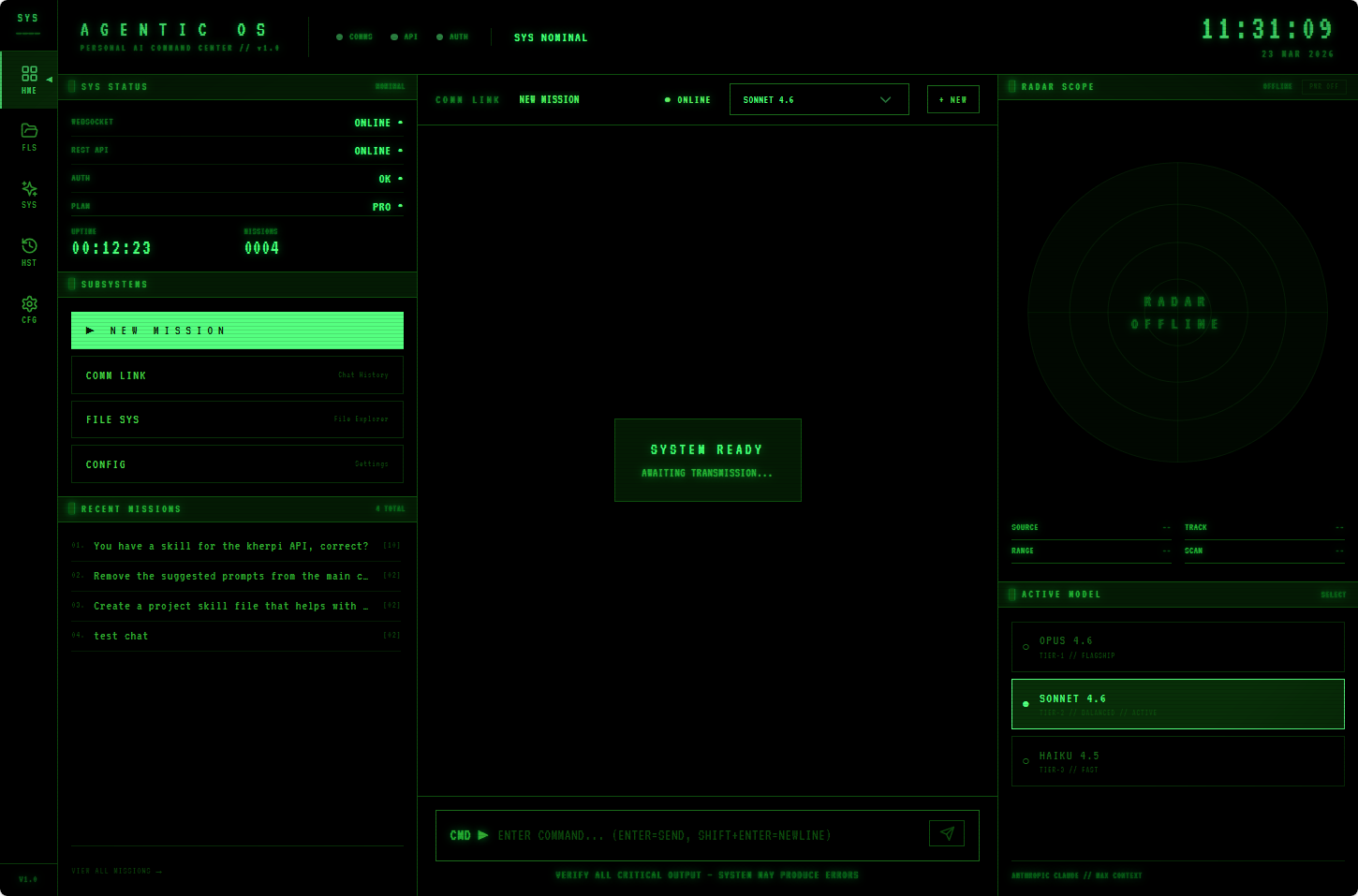
AgenticOS is a fully custom, self-hosted personal AI command center built around Anthropic's Claude Code CLI. It wraps the raw Claude Code agent in a bespoke web application with an immersive vintage phosphor green CRT cockpit aesthetic — designed to feel like a military operations terminal or retro computer workstation rather than a generic chat interface.
Purpose
Rather than interacting with Claude Code through a plain terminal, AgenticOS provides:
- A persistent, session-aware chat interface with full message history stored to disk
- A real-time system status dashboard showing WebSocket health, API connectivity, auth state, uptime, and mission count
- A live radar scope using GPS geolocation and vector map tiles rendered in CRT green
- A model selector with instant switching between Opus 4.6, Sonnet 4.6, and Haiku 4.5
- Tool call visualization — every Claude tool use (file reads, edits, searches) is shown as an expandable card with live status
- A full file explorer and sessions browser for navigating past conversations
Architecture
Stack
| Layer | Technology |
|---|---|
| Frontend | React 18 + TypeScript + Vite |
| Styling | TailwindCSS (custom CRT design system) |
| State | Zustand |
| Map | MapLibre GL JS + OpenFreeMap vector tiles |
| Backend | Node.js + Express |
| Realtime | WebSocket (ws) |
| AI Engine | Claude Code CLI (spawned as child process) |
| Session Storage | JSON file on disk (data/sessions.json) |
Communication Flow
Browser (React)  ──HTTP──►  Express (port 3001)  ──spawn──►  claude CLI
                 ◄──WS───   WebSocket Server      ◄──stdout─  streaming output
The Express server spawns claude as a child process and pipes its streamed JSON output over a WebSocket connection to the frontend in real time. This means every token, tool call, and status update appears live in the UI as Claude works.
Session Persistence
All conversations ("missions") are stored in data/sessions.json and survive server restarts. Each session tracks:
- Unique ID (UUID)
- Title
- Creation timestamp
- Message count
- Full message history (user + assistant + tool calls)
UI Design System
The entire interface follows a strict Vintage Phosphor Green CRT Cockpit theme. Key design decisions:
- Background: Near-black
#010801/#041a04— the dark phosphor base - Primary accent:
#00ff41— bright phosphor green for active elements - Mid-tone green:
#33aa33— secondary labels and radar overlays - Dark green:
#0d4d0d— subtle grid lines, borders, inactive states - Typography: Monospace (
font-mono), wide letter-spacing (tracking-widest), ALL CAPS labels - Animations: Radar sweep rotation, pulsing status dots, cursor blink effect
- Layout: Three-column cockpit layout on the Home view — left status/nav panel, center chat, right radar/model panel
Views
| View | Label | Description |
|---|---|---|
HomeView |
HOME | Cockpit dashboard with live status, chat, radar scope, model selector |
ChatView |
MISSION | Standalone AI chat with tool call cards and streaming output |
SessionsView |
COMM LINK | Browse and resume past conversation sessions |
ExplorerView |
FILE SYS | Navigate the project file system |
FeaturesView |
FEATURES | Feature overview and capability reference |
SettingsView |
CONFIG | Model and application configuration |
Radar Scope
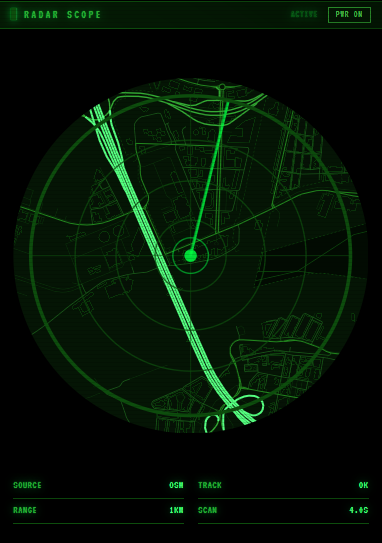
One of the signature features of AgenticOS is the Radar Scope panel — a circular map widget that:
- Requests GPS geolocation from the browser
- Centers a MapLibre GL map on the user's location at zoom level 13
- Renders the map in full CRT green monochrome using a custom vector style:
- Background:
#041a04 - Roads: green gradients from
#0a330a(paths) to#55ff80(motorways) - Water:
#020b02 - Buildings:
#061206with#0a3a0aoutlines
- Background:
- Overlays a rotating radar sweep animation and concentric range rings
- Shows a pulsing dot at the user's current position
The radar can be toggled on/off with a PWR ON / PWR OFF button, which switches it to a static offline SVG when disabled.
Claude Integration
Models Supported
| Model ID | Label | Tier |
|---|---|---|
claude-opus-4-6 |
OPUS 4.6 | TIER-1 // FLAGSHIP |
claude-sonnet-4-6 |
SONNET 4.6 | TIER-2 // BALANCED |
claude-haiku-4-5-20251001 |
HAIKU 4.5 | TIER-3 // FAST |
The model is selectable live from the right panel on the Home view, persisted in global Zustand state, and passed to the server on each new message.
Tool Call Visualization
When Claude performs an action (reads a file, runs a bash command, searches code), the frontend renders a ToolCallCard component showing:
- Tool name (e.g.,
Read,Bash,Grep) - Execution status:
[ WAIT ],[ RUN ],[ DONE ], or[ ERR ] - Expandable input/output details
Skills System
AgenticOS extends Claude's capabilities via a skills system — Markdown prompt files stored in .claude/skills/. Currently active skills:
| Skill | Description |
|---|---|
ui |
Enforces the CRT cockpit design system for all UI work |
kherpi-api |
Manages documents and media on kherpi.com via REST API |
claude-api |
Patterns for building apps with the Anthropic Claude API |
update-config |
Configures Claude Code settings and permissions via settings.json |
loop |
Runs recurring prompt tasks on an interval |
simplify |
Reviews changed code for quality and efficiency |
Development
Running Locally
# Install all dependencies
npm run setup

# Start both server and client in development mode
npm run dev
The server runs on http://localhost:3001 and the Vite dev server proxies API calls.
Environment
CLAUDE_MODEL=claude-sonnet-4-6
PORT=3001
KHERPI_API_TOKEN=<your_token>
Project Structure
AgenticOS/
├── client/              # React + TypeScript frontend
│   └── src/
│       ├── views/       # HomeView, ChatView, SessionsView, etc.
│       ├── components/  # Sidebar, UI primitives
│       └── store/       # Zustand global state
├── server/              # Node.js + Express backend
│   └── src/
│       ├── index.js     # Main server, WebSocket, Claude spawn
│       └── auth.js      # Claude auth status check
├── data/                # Persistent session storage
├── docs/                # Screenshots and documentation assets
└── .claude/             # Claude Code configuration and skills
    └── skills/          # Skill prompt files
Status
- Version: 1.0
- Platform: Windows 11 Pro
- Primary model: Claude Sonnet 4.6
- State: Active development